Over the past few days, I've been working on a mashup of recent Blogger comments and IntenseDebate comments. In case you're unfamiliar with IntenseDebate, it's a neat commenting system that you can install into your blog in a few simple steps. It comes with many features not found in Blogger, like threaded comments/reputation/comments export and import, and supports quite a number of blog platforms.
Unsurprisingly, it comes with a recent comments widget as well. The widget has a clean and neat design that compliments the IntenseDebate comments form. I almost installed it when I discovered there were several drawbacks with the IntenseDebate recent comments widget. The two most significant in my case are the use of javascript and the lack of Blogger comments.

IntenseDebate recent comments widgetFor most users, the latest comments widget provided by IntenseDebate should suffice. However, I try to avoid using external javascripts whenever I can as I already have many widgets and scripts on this blog. In addition, I'd like to track comments for my other posts as well, which were made before I installed IntenseDebate. (IntenseDebate has an import tool to import older comments, but is currently in beta.)
BIcomments - Recent Blogger + IntenseDebate Comments
Hence I created
a mashup of Blogger and IntenseDebate comments using Yahoo Pipes. It takes both comment feeds, mixes them up a little and spits out a nice and proper feed so that you can use it in Blogger.
The features:
- Shows latest comments from both Blogger and IntenseDebate. It can also be configured to display either Blogger or IntenseDebate comments.
- Number of recent comments can be customized. Note that Blogger displays a maximum of 5 items in a feed.
- Length of comments can be customized. If a comment exceeds your chosen length, an ellipsis will be appended to the end of the comment. Note that three dots are actually appended instead of an actual ellipsis. :)
- Returns a feed. In Blogger, a feed is dynamically included into your blog as HTML, so there's no client side processing.
- CSS styling. As a feed in Blogger is essentially HTML, you can style your recent comments with CSS.
- Profanity Filter. A portion of the profanity will be replaced with asterisks.
BIcomments Howto
The design of BIcomments makes it very flexible and user-friendly. New users will like its simplicity, while advanced users will be able to change and mold it to their liking.
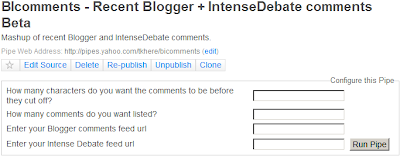
Configuring BIcomments - How many characters do you want the comments to be before they cut off? - quite self-explanatory. As I've mentioned, comments exceeding the length that you enter will be cut off and an ellipsis appended to the end of the comment.
- How many comments do you want listed? - again, self-explanatory. For Blogspot, 5 is the maximum that you should enter, since Blogspot will display no more than 5 comments.
- Enter your Blogger comments feed url - Leave this blank to show only IntenseDebate comments in your feed. Otherwise, stick your Blogger feed URL here.
- Enter your Intense Debate feed url - Leave this blank to show only Blogspot comments in your feed. Otherwise, stick your IntenseDebate feed URL here. You can find it in your Dashboard under the last 5 comments section.
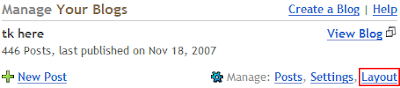
Quick start for Blogspot Bloggers - Login to Blogger and click the Layout link.
- You should be in Page Elements now. Click Add a Page Element.
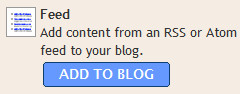
- Look for Feed and click Add to Blog. A window should appear asking you for a Feed URL. This is what we'll be getting in the next few steps.
- Visit the BIcomments page and configure it the way you like (as mentioned above in Configuring BIcomments).
- When you're done configuring your feed, run the pipe and look for more options (under Use this pipe). Click Get as RSS.
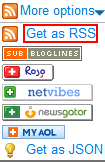
- Copy the URL of the RSS feed in your location bar and paste it into the Feed URL box in step 3. Click continue.

- Configure the feed options and when you're ready, click Save Changes.
- Profit!
The result and some thoughts
For a preview of how it could look like on your blog, just
take a look at it in my left sidebar. :) I did some minor transformations and spiced it up with CSS so yours might look quite different. :P
I'm quite satisfied with this mashup as it returns proper author, link, description and pubDate tags. (Thanks to IntenseDebate for adding the author tag upon my request!) The title tag is the only tag that requires an ugly hack, as Blogger returns truncated comments as the title (Grr...). (IntenseDebate returns author + post title.) A quick workaround was to extract it from a page URL. This is also the only reason why this is in beta. :)Just a day after I wrote this, Yahoo Pipes
implemented a new feature that allowed me to extract the post title using a (fairly) complicated method I've worked out. Hence BIcomments is out of beta and in its first (and likely to be final) release. :)
If you've got any questions, comments
or tips on how to magically insert actual post titles into BIcomments (the method I've come up with is complicated, troublesome and requires a lot of overhead), you're more than welcome to use the IntenseDebate comment form below. :)