Google
You could also try tk Social Bookmarking Search or tk Video Search!
Showing posts with label download. Show all posts

Friday, December 21, 2007

Hellboy II: The Golden Army Trailer!

Comments

The short version from :

The mythical world starts a rebellion against humanity in order to rule the Earth, so Hellboy and his team must save the world from the rebellious creatures.

The longer version from :
After an ancient truce existing between humankind and the invisible realm of the fantastic is broken, hell on Earth is ready to erupt. A ruthless leader who treads the world above and the one below defies his bloodline and awakens an unstoppable army of creatures. Now, it’s up to the planet’s toughest, roughest superhero to battle the merciless dictator and his marauders. He may be red. He may be horned. He may be misunderstood. But when you need the job done right, it’s time to call in Hellboy (Ron Perlman).

Saving the world is a HELL of a job!


.


Thursday, December 20, 2007

Howto: Be a real Jackass and Download Jackass 2.5 from BlockBuster (includes non-US workaround!)

2 comments

By now, you should have heard that you could (legally) watch Jackass 2.5 in the comfort of your home. Just head over to the (before 2008!), show some ID and success! Paramount Pictures, buffering, Johnny Knoxville, pause, rinse and repeat. Or not.

Tired of the occasional stuttering and frequent pauses, the jackass side of me kicked into motion and came up with an ingenious scheme to download Jackass 2.5 so that I could actually watch it and not wait for it. After I tasted sweet success in this endeavor however, the better part of me came into play once again, which is why you're reading this guide right now.

Tools of the trade

First things first. Let's get ourselves prepared. You'll need to download and install the following tools/programs.
Note: Remember to uncheck the installation of the toolbar for Flashget.

Get me that Jackass!

Once you're sure you've got everything installed, it's time to get into action.

  1. If you're outside the US, start HotSpot Shield. Next, right-click on its icon in your system tray and click on Connect. A browser window should popup and show Hotspot Shield connecting to its servers. When its icon looks like this Good to go!, you're good to go.

    Connecting...

    Note: HotSpot Shield has a server that seems to be mis-configured in some way. Specifically DNS lookups will fail so your browser will complain about being unable to find sites. If you can't visit any site after Hotspot Shield's icon turns green, simply disconnect and reconnect. Pray that you don't connect to the same server (1/7 probability, a bit lower than ) as these connections are made randomly. If you know how OpenVPN works, you can also edit the config to avoid this.

  2. Next, run Firefox and clear out your cookies. This is to remove the evil jackass_geo_check cookie that you get when you first visited the Jackass site.

    Clear them out!

  3. Surf down to the in Firefox.

  4. Surrender your email address to them or use to get a disposable one. After confirming the email address, login (by entering your email address) to begin viewing Jackass 2.5.

  5. Before it starts however, a short advertisement featuring a spinning globe will get in your way. Ignore it or you could watch it if you really want to. While this advert is playing, click on the arrow beside Download Helper icon (three colored spinning balls) and observe the dropdown menu carefully. You may need to wait a while, but an option called "jackass25_1000k_v1_feature_production.wmv" should appear.

    Download Helper

  6. When that option appears in the dropdown menu, click on it and save it as a text file.

    Save as a text file

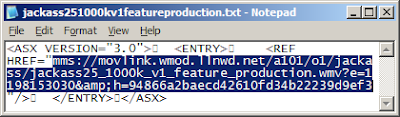
  7. Open up the text file you'd just saved and copy the mms link (Ctrl+c) inside of it. It should look similar to the one below.

    Open text file

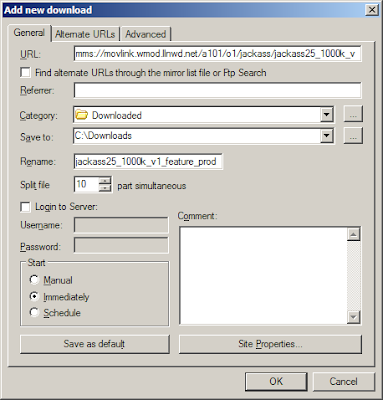
  8. Now close Hotspot Shield, run Flashget and add a new Flashget download by pressing F4 when the Flashget window appears. Flashget is pretty smart as it'll automatically detect the mms link you just copied (to your clipboard) and paste it into the URL box, so you'll just need to configure the rest of the options as seen below.

    New Flashget download

  9. Begin your download by clicking ok.

    Jackass 2.5 download

  10. Profit!


DocSyncer Beta Now Open to Public (refer new members and win an 8GB iPhone!)

Comments

has finally opened their doors to the public. From now until midnight of Christmas Day, the user that refers the most number of new members will win an 8GB iPhone! If you would like to see me win that 8GB iPhone, just click and sign up for DocSyncer.

What's DocSyncer?

Ever had the situation where you can't find the document you want? With DocSyncer, you can simply sync them all into your DocSyncer account and you'll be able to access all of them from one common location. When you install DocSyncer on your computer, it'll scan your computer for documents and upload them to your DocSyncer and Google Docs accounts. If you edit any of them, DocSyncer will detect this and sync the new versions into both your accounts, while retaining the old ones.

Using DocSyncer

There are a couple of things to do when you first log in to DocSyncer. The very first thing you should do is grant DocSyncer access to your Google Docs account. This is simple to do and should be the first thing you see after logging in for the first time.
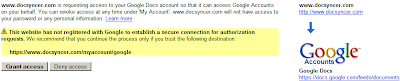
Granting DocSyncer access

Next, you'll be prompted to change your password. For security reasons, sticking to the password that they generated for you is not a good idea. So go ahead and switch it to a decent password.
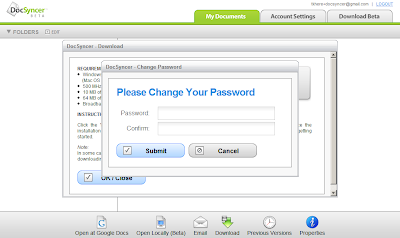
Change your password

Finally, you'll be asked to download and install DocSyncer. This is required for syncing your documents to your DocSyncer account and can be installed on as many computers as you want. It currently runs on Windows 2000/XP/Vista, with a Mac OS X version in the works.
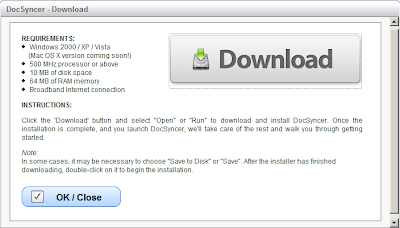
DocSyncer download

However, one other thing I would recommend is to go into your settings and changing "Always use SSL to view documents" to Yes. For some reason, this was set to No by default.

Enable SSL

Me and DocSyncer

After installing DocSyncer on my computer, I created a test text document and waited for the magic to happen. Fortunately for me, it wasn't long before it appeared in my DocSyncer account. However, unlike DocSyncer, syncing to Google Docs is not immediate and took quite a while to occur (about 15 - 20 minutes). This is a known issue and the DocSyncer Team hopes to make Google Docs syncing immediate. (I know the screenshot says otherwise, but that's beacuse I took it after it synced to show you the full range of right-click options.)
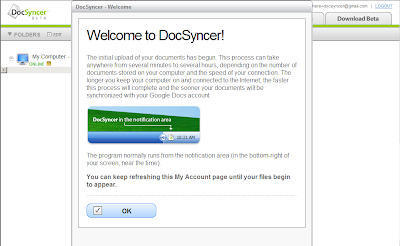
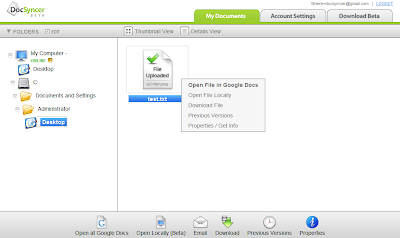
Welcome to DocSyncer!

DocSyncer

While waiting for DocSyncer to update the files in my Google Docs, I edited the text document and wondered what would happen. About a minute later, the new version appeared in my DocSyncer account, with the older version available for download! Although I had expected this, it's pretty cool to see it in action.
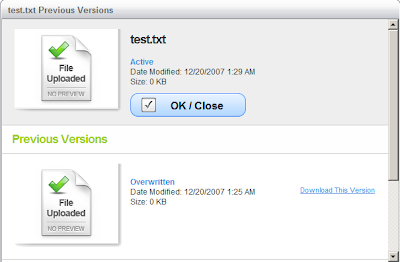
DocSyncer

With nothing showing up in my Google Docs, I tried renaming the test document. I thought to myself, "surely, DocSyncer wouldn't know what to do now". Sadly, my devious plans to trip up DocSyncer weren't going as planned. DocSyncer handled it easily as you can see below.
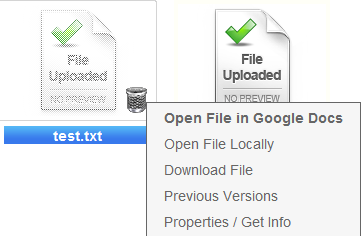
DocSyncer

By now the files had appeared in my Google Docs account. Each new revision was uploaded as a separate file and the uploaded files weren't organized into their respective folders. Both are known issues that they're currently working on. However, be aware that if you edit a file in Google Docs, DocSyncer won't know about it unless you save it to your computer and launch DocSyncer for syncing.
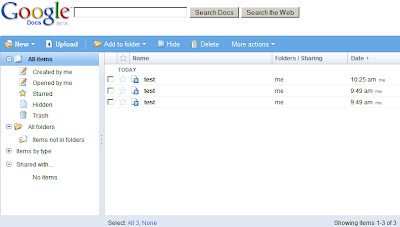
DocSyncer

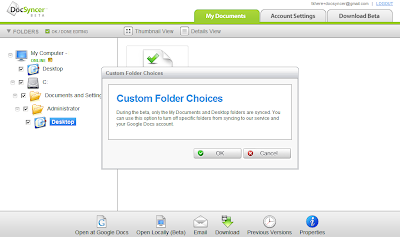
I didn't mention this at the beginning but the very first time I ran DocSyncer, I was wondering why my other documents weren't being synced. As it turns out, syncing is currently limited to the My Documents and Desktop folder. At the moment you can only turn off/on syncing for these folders, although they'll be expanding this to include all folders.
DocSyncer

Despite the minor setbacks I've experienced in DocSyncer, using it was mostly a pleasant experience. Even though it's in beta right now, there are no major show-stoppers, thus making it suitable for daily usage. As it continues to evolve, I'd expect it to improve even further in the future.

 

Wednesday, December 19, 2007

Launchy goes 2.0!

Comments

A new version of was just launched by the Launchy team! New in this release are awesome skins and icons, cool fading effects, Vista support and well, "it’s just better".

Launchy is a program/shortcut launcher that was

designed to help you forget about your start menu, the icons on your desktop, and even your file manager. Launchy indexes the programs in your start menu and can launch your documents, project files, folders, and bookmarks with just a few keystrokes!

Using Launchy

Launchy in action

Need the command prompt? Or did you mean the Control Panel? Launchy's smart auto-suggest is so good, it's like it can read your mind. The default install of Launchy only indexes the start menu and a few other locations, so if you have programs that do not create start menu icons (portable apps comes to mind), you'll need to add them to Launchy.

Need to Google something?

With the Weby plugin in Launchy, it's so easy to Google a term. First you'll need to hit Alt+Space to bring up Launchy. Next type "google". Now hit Tab and you'll see an arrow appear. Key in your search terms, press enter and Lanuchy will do the rest. Other supported web searches include IMDB, Wikipedia, Yahoo and more.

However, that's not all Launchy can do. For example, basic arithmetic is a piece of cake for Launchy. You can also extend Launchy's abilities with custom commands and or theme Launchy by downloading new skins.


.


The Latest Wall-E Trailer!

Comments

Here's the second Wall-E trailer that isn't even on yet. Like the , there's no dialogue, only wonderful lively background music. The plot goes a bit like this -

On an abandoned Earth where trash has taken over, a robot named WALL-E (Waste Allocation Load Lifter Earth-Class) accidentally finds the means for humans to return to their planet. Another machine, EVE, leaves to tell humanity the good news, and WALL-E follows her into space. (rottentomatoes.com)

Download the high and ultra high quality versions at .


[via ]


Monday, December 17, 2007

The Dark Knight IMAX Prologue (6 and a half min preview) + Official HD Trailer

Comments

I'm a bit late on this one but here's the crappy 6:30 minutes in-film cam footage of the Dark Knight aka the IMAX Prologue (I'm sure you can guess why). This short clip is all about the Joker and his crew, so fans of the Dark Knight himself may be quite disappointed. Not a problem for me though, although I'd prefer the rest of it as well. :D


As for the official high-res trailer (Death trap), you can also watch and download it at .


iNdependence 1.3.1 and iPhones' NCK Length (aka master unlock code)

Comments

iNdependence 1.3.1

Over the weekend, the 0perator updated the Mac jailbreaking software, , to version 1.3 and finally to 1.3.1. The most important features in these releases were the introduction of proper 1.1.2 and 7.5 compatibility, instead of the hacky workaround in older releases. See the changelog below or read the . A recently prepared also provides answers and hints on carrying out several tricky but common iPhone scenarios.


v1.3.1 (Hacker-Pschorr) - 12/15/07

- Added instructions for upgrading from 1.1.1 to 1.1.2
- Made UI look proper on Leopard (all text should have been black)
- Fixed a major bug in setting the correct file permissions for anySIM
- Added more credits for anySIM
- Added serial number to Info tab


v1.3 (Velvet Fog) - 12/14/07

- Added 1.1.2 compatibility
- Added iTunes 7.5 compatibility (no need for for the MobDev tool I created earlier) -- thanks to planetbeing for this
- Removed previous ringtone syncing code (not needed with 1.1.2 or MeCCA patched 1.1.1)
- Added anySIM 1.2 (in addition to 1.1) and baseband version detection so that the correct version of anySIM is installed
- Updated the documentation for firmware 1.1.2 and SIM unlocking
- Added Info tab which contains detailed status information


Download .

NCK Length of iPhones

Geohot has discovered that the master unlock code (NCK) of the iPhone is . This key is unique to each iPhone and allows the iPhone to be permanently unlocked, which makes it very interesting as a long term unlock solution. Attempting a brute force attack (trying all possible combinations) on such a long key length is neither feasible nor practical, and as such, he hopes to identify similarities between these NCKs in order to cut down on the time required to look through the entire key space.

However, as the iPhone allows only 5 tries of the NCK, the only sane way to carry out a brute force is outside the iPhone environment. This was made possible recently with the . Other folks are now looking into retrieving NCK codes for iPhones with the 3.9 bootloader so that they can stay unlocked forever. No luck for iPhones on the 4.6 bootloader though, an update from Apple is still required for this method to succeed.

Relevant Hackint0sh threads -


Friday, December 14, 2007

Free: Win/Mac DivX Pro Holiday Download

Comments

For a limited time only, the DivX Pro Bundle is available for absolutely free! Normally priced at $19.99, the download includes the pro versions of DivX Codec and DivX Converter as well as the free DivX Player and DivX Web Player.

With the DivX Codec and DivX Converter, you will be able to playback DivX videos as well as encode videos into the DivX format, which can then be uploaded to Stage6 for sharing. These DivX videos will be compressed into smaller file sizes than the original files, but will retain much of their quality.

To take advantage of this offer, simply click on the appropriate link: |

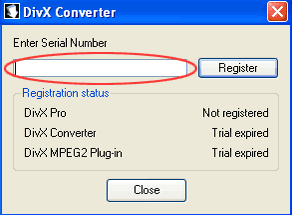
Follow the instructions on the site to install DivX Pro and when prompted for a serial number, just copy and paste the listed codes below.

Serial Numbers

Windows DivX Pro serial

Windows: A3NI9M7P47B325A52C26


Mac DivX Pro serial
Mac: 338BSZ759249T26B2M9E


If you arrived at the party late, another alternative is to to your site and send the URL to DivX for a free copy of DivX Pro.

[via ]


Sunday, December 09, 2007

Free: ShortcutGuide, Fonts Of The Month

Comments

Offtopic: Haven't had a "free" post for some time, so it's time to bring it back. :) No iPhone post today either, but things are mostly stagnant at the moment. Unless you consider baseless rumors interesting...

ShortcutGuide

ShortcutGuide Started by 2 grad students, ShortcutGuide is home to 952 shortcuts from a selection of 34 programs which includes desktop apps like Windows and iTunes and online apps like Gmail. Rather than simply listing the shortcuts, ShortcutGuide highlights possible key combinations on a virtual keyboard and describes their actions when you hover your cursor over a key.

Shortcuts are also categorized based on their actions and hovering over an action results in the key combination of the virtual keyboard being highlighted. It's these little touches that make ShortcutGuide a pleasure to use. However, while at the site, I noticed that one Windows shortcut - Win+D (toggle show desktop) - was not included. I didn't go looking for more missing shortcuts, but it looks like they have much to learn. :P

Smashing Magazine's Free Fonts of the month

Droid fonts

This month, looks at Relato Sans, Google Android fonts and the iPhone fonts. It may not be much to choose from but rest assured that they will look fantastic almost anywhere. I'm not sure which one I prefer since they're all fabulous.


Thursday, December 06, 2007

winChain - Quick Start to Native iPhone App Development on Windows

2 comments

If you've always wanted to code very own iPhone program but were afraid to try, Drakenza, the author of , has come up with a pre-built environment for developing iPhone apps on Windows.

winChain

A 500MB+ download in total, simplifies the setup and installation of required files and programs. winChain also comes with a Template Generator that can be used to create a skeleton application. You can then code in this skeleton application and build your first iPhone app. For detailed instructions on using/installing winChain, head over to the .

With the release of winChain, at least one major obstacle is out of the way. Now all you have to do is pick up programming. ;)


Tuesday, December 04, 2007

Windows Tip: Lower Your StartUp Time!

Comments

Do you have a gazillion programs loading at startup? Like your antivirus, firewall, antispyware, wireless manager, Windows Live Messenger and... well you get the idea. Waiting for all of them to startup is a daily sacred ritual, but not one that you particularly enjoy.

One way around this is a no-brainer - just remove some of the programs that load when Windows starts up. However, sacrificing any one of those frivolous startups is akin to asking you to go without your daily cup of caffeine. This must be your lucky day as there's another way out without binning all those wonderful programs.

Startup Delayer

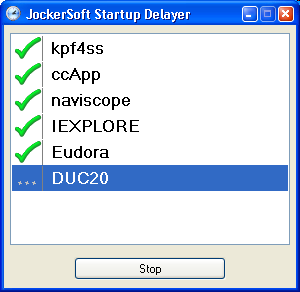
(no they're not jokers) enables you to delay the startup of programs so that they actually load faster, which in effect boosts the speed of Windows startup. If you're thinking that sounds rather contradictory, think of it this way. Your computer can only load a certain amount of programs at an optimum speed. Once you exceed that, diminishing returns set in and everything slows to a crawl.

StartupDelayer mitigates this by introducing a small interval between the initialization of each program. This way your computer is able to start each program quickly, which translates into faster startup.

Startup Delayer

Another use of StartupDelayer is to batch run a number of programs. For example, your daily computer routine may consist of surfing and instant messaging while listening to your MP3s. Just add your internet browser, instant messenger and MP3 player to a sequence and assign a shortcut to your saved sequence. The next time you start your computer, just double-click the shortcut to run all 3 programs at once! (StartupDelayer is not required to batch run programs, but it is simpler than creating a batch file.)

StartupDelayer runs on Windows 98 - ME - NT 4(service pack5) - 2000 - XP - Vista and requires .


Monday, December 03, 2007

Windows Tip: Toughen Up Your ToolTips! (or how to unhide hidden tooltips)

Comments

Have you ever encountered the annoying bug where the tooltips at the system tray simply won't show up in front? I have and I can't believe the number of times when I was trying to take a quick look at the current date or the current song playing, only to be left frustrated by this disappearing trick.

Peek-a-boo!

Well someone was so irritated by it that they whipped up a fix, but the best part is it's free! Download and install into your system and no longer will you suffer at the hands of this evil bug. After installing ToolTipFixer, it'll install a Windows service that will take up only 6KB of your memory. This service is set to run automatically when Windows starts, so you'll never need to run it manually.

Cured of stage fright!

ToolTipFixer works on Windows XP/Vista and requires .


Thursday, November 29, 2007

Forex Fun with eToro

Comments

Ever since was featured on and , I've been addicted to Forex trading with eToro. Actually, I've been playing this since yesterday. :)

As TechCrunch rightly points out, eToro's friendly interface makes the boring, serious world of Forex fun. At this stage, let me just state for the record that I'm not a professional Forex trader nor do I have any prior experience with Forex trading. I do however have the (very) basic knowledge of how currencies work.

With that in mind, I skipped the introductions and dived straight into the big bad world of Forex. Out of the 4 eToro games available, the first game I tried out was the Forex marathon. Just select the currency which you think would rise above the rest and sit back and relax as they race against one another.

Forex marathon

Forex marathon, stolen from TechCrunch ;)


It was quite enjoyable to watch the Japanese sumo wrestler pitting himself against the American and European. As your selected currency rises/falls, the corresponding character will lead the pack or fall behind the rest. I'm sure many new traders will prefer this alternative representation to the standard graphs and charts as a single glance will tell you whether you made the right choice even if you're a layman.

However, Globe trader was the game that I excelled in. In Globe trader, you buy/sell currencies to make a profit. As the market fluctuates, you will hear a pinging sound, which was useful and sometimes annoying (it can be turned off).

Globe trader

Within an hour of risky trading, I made over $500. Unfortunately, my lucky streak came to an end and I ended up losing over $1000. This goes to show that the volatility of the Forex market is something that cannot be underestimated.

Although eToro's interface may seem very childish, it does actually provide vital details like the market spread, your current profit/loss and the ability to take profit or stop loss (profit/loss threshold). However, after my short trading experience, I wished it had more features like scheduling and the ability to carry out more consecutive trades. Nevertheless, eToro brings the much needed element of fun into the Forex trading world.

eToro runs on Windows XP and possibly Vista.


Saturday, November 24, 2007

Free: miniMIZE, lingro

9 comments

Offtopic: Yeah, no freebies yesterday. Didn't feel like it. :P

miniMIZE

miniMIZE captures all your minimized windows and displays tiny thumbnails of them on your desktop. Think of it as without the fancy animation, Thumbnail preview in Opera 9 or tab preview in Firefox 3. As miniMIZE sits in your system tray, it'll monitor for minimized programs and stick them onto your desktop, freeing up your taskbar. Double click on each thumbnail and the application pops back up in its original state.

miniMIZE in action Although miniMIZE can be customized to your liking, there were several quirks that I experienced. For example, if you press WIN+D (Show Desktop) or WIN+M (Minimize all windows) while an application is in focus, it'll not show up as a thumbnail. In fact, it'll just disappear into oblivion. Fortunately, Alt+Tab will bring the missing program back to life.

A workaround for this is to set a hotkey in miniMIZE to miniMIZE all your windows. You'll have to live without two windows shortcuts, but at least it works. I highly recommend assigning hotkeys for all three functions in miniMIZE as they'll come in handy.

miniMIZE runs only on Windows XP and is in beta.

lingro

lingro claims to be "The coolest dictionary known to hombre!" and I can't say I disagree with them. lingro is an open source dictionary that relies on the work of other dictionaries as well as its own user submitted definitions to provide translations for thousands of words.

Other than its , lingro also hosts what it calls a and a . Viewing websites through the web viewer will allow you to click on any word to retrieve its definition, while the file viewer allows you to upload files and do exactly the same thing.

Whether I'm using its web viewer or online dictionary, lingro is always fast and responsive. Its definitions are on par with competing closed source dictionaries and if you don't understand a word in the definition, just click on it twice to get its meaning. This can go on infinitely and before you know it, you end up learning about a ton of different words.

After my experience with lingro, I won't be surprised if lingro becomes the de facto online dictionary in time to come. In fact, I'm already wondering if someone has come up with a greasemonkey script or Firefox addon so that all web pages come lingrofied.


Check out the . :)


Thursday, November 22, 2007

Free: PipeBytes, Trust-No-Exe

Comments

Offtopic: I've completed my new Blogger hack. I'm not sure if anyone's done it before since it's quite simple, but I'll guess I'll know when I post it. Oh and happy Thanksgiving if you celebrate it!

PipeBytes

PipeBytes Want a fuss-free way to share a couple of files with your not-so-computer-savvy friends and vice versa? Just stuff your internet pipes with . Whether you're the sender or receiver, with PipeBytes all you need is a browser and you're ready to begin transferring files to anyone in the world. As you upload your files, your friends can simply start downloading them from you without waiting for your upload to complete.

128kbps upload limit

Unfortunately, while PipeBytes is incredibly simple to use, it does have some severe limitations. The biggest drawback is the capping of the upload speed to 128kbps for free users. Transferring a 21MB file to myself took approximately 25 min, which is a bit too long for my liking.

Sending files above 5MB is probably out of the question with PipeBytes as it doesn't support resuming either. If you're hoping to send the same file to multiple users, you'll have to repeat the upload process for each user. PipeBytes is supported by advertising, but don't worry too much about that. You'll probably won't even notice the Google ads while you're enjoying the YouTube videos.

Pipebytes is great for the occasional file transfer, but for heavy duty file sharing, I suggest looking elsewhere for solutions.

Trust-No-Exe

Trust-No-Exe

Afraid that the family computer will be taken over by rogue malware this holiday season? You could setup limited user accounts for your family members or you could go one step further and install as well.

Trust-No-Exe options

Trust-No-Exe works by blocking every type of executable file, including .exe, .scr, .com, .dll and more, not on the access list from running. According to the site, Trust-No-Exe monitors if a file is loaded as a process or thread by the operating system, which means that a simple file rename will not be able to trick Trust-No-Exe.

When I gave Trust-No-Exe a test run, I noticed that even Administrators are not spared the "Access Denied" dialog box. This comes in handy if you accidentally execute a malicious file. (Yes, it happens to the best of us.) The access list in Trust-No-Exe works as a whitelist, while the deny list is a blacklist. This means every program not on the access list will be blocked from running, while those on the deny list will also trigger the warning.

Trust-No-Exe comes with features for easy deployment on multiple computers and the warning message can be also be customized. Trust-No-Exe runs on Windows NT/2000/XP.


Don't trust anyone, except... me. :P


Wednesday, November 21, 2007

Just out: IPtools, What Lockdownd is All About

Comments

Offtopic: Another uneventful day. Wonder if geohot will be successful in dumping the UK bootloader anytime soon.

IPtools

The iPhone Elite Team has packaged the tools, , that they released yesterday into one downloadable package called . Meant to run on the iPhone, the tools require

1. The BSD Subsystem (patricularly tar and gzip)
2. A way to copy files to your phone
3. A way to run commands in a terminal on your phone


Get .

A detailed explanation of Lockdownd

An was posted on the iPhone Elite Team wiki. It's not necessary to read it, but if you do, you'll be able to learn about the different activation states, the circumvention of Apple's security logic, brick mode and more.


Tuesday, November 20, 2007

Free: University Courses Online, CNET UK Internet TV, Uninstallers

Comments

Offtopic: Working on a new Blogger hack soon. ;)

Free university courses online

Fancy taking a course at , or but don't want to fork out any cash? Now you can browse through any of their open courseware offerings available online for free! With a wide range of courses available and , it's your chance to get a tertiary education without actually attending classes. Although universities won't officially recognize your Physics knowledge gained through their online courses, keep in mind that (with a Physics degree).

[via ]

(If you remember seeing something like this, .)

CNET UK Internet TV

CNET TV The just launched and is getting pretty good feedback so far. Other than its slick and smooth interface, videos are of better quality and resolution than most Flash videos you see. Besides quality, there's also quantity. Despite its recent launch, it has already been populated with a decent selection of videos to watch, ranging from technology to music. And if you happen to have a widescreen monitor, you're in luck as all the videos are in widescreen format (I think :) ).

Just a tip: I've updated to include CNET's new site. :)

Uninstallers

Installing programs to uninstall programs. Kinda ironic, don't ya think? I, for one, have always relied on Windows Add/Remove to do the dirty work, but if that isn't powerful enough for you, . Read each of them carefully since some of them do not require installation or provide a standalone version. Personally, I'd go for the ones that need no installation since I'd like to avoid the situation of installing programs to uninstall the uninstaller. :)


Just out: iPatcher, bricktool

Comments

Offtopic: Mark at Hack the iPhone informs us that They've also released a program called iWorld to fix the crashing phone/sms app issue. You can find iWorld in Installer under Tweaks (1.1.2).

iPatcher

The first of the iPhone Elite Team new releases of the day, ,

is a program that runs on MacOS X, Win32-Cygwin, and the iPhone.

It will automatically patch lockdownd to make the iPhone appear activated, regardless of the actual activation state. It has been designed to patch the following firmware versions:

-1.1.2 -1.1.1 -1.0.2 -1.0.1 -1.0.0 -As many alternate lockdownd patches as we could find.


Supposedly it's able to patch modified lockdownd files, but it's recommended to revert to the original version so that iPatcher will recognize it easily. If you plan to run it on Windows, needs to be installed first. Read more about .

bricktool

The second iPhone Elite Team release, , toggles the brick mode of your iPhone. Apparently when your iPhone stops working as a phone, the firmware may have enabled brick mode. Upon compiling bricktool, you can disable this brick mode. For more details, read about .


Monday, November 19, 2007

Free: Munseys, Wishlistr

Comments

Offtopic: Of ebooks and wishes...

Munseys

Munseys The site formerly known as is back (was ). Reincarnated as , it proudly claims to have over 20,000 rare ebooks in 10 different file formats, from pure HTML to PDF to the Sony Reader ebook format. And that number is growing by 10+ ebooks per day. Although the books at Munseys are likely to be older than most readers, true book lovers will be delighted to see such a large number of (out-of-print) ebooks at their disposal.

Wishlistr

Wishlistr With holidays just around the corner, what better way to spread your wishes than with ? Add items to your own wishlist, style it up for the holiday mood and spam your friends, family or anyone else that might be buying you a gift. Armed with your online wishlist from Wishlistr, everyone will be wishing they didn't know what you wished for instead. :P

Wishlistr Santa


I wish I had an iPhone. :P


Just Out: iDemocracy 2.0.1 and Hidden Features, Updating to 1.1.2 OSX Unlock Guide

Comments

iDemocracy 2.0.1

Due to several bugs in , Drakenza has updated .

Bugfixes:

1. No more incorrect symlink error messages for the Long Method.

2. Hacked out parts of the virginator.sh script to get around problems with input.

3. Changed virginizer password from "alpine" to "dottie" so that it's actually usable now.


Fortunately, doesn't require a complete re-download and is a lighter patch file at 1.2MB.

iDemocracy 2.0.1 Hidden Features

iDemocracy 2.0.1 comes with several hidden (read: experimental/unstable) features that can be enabled simply by editing a text file. to find out how to enable them and what they'll do.

Additional Countries for Phone+SMS Fix
Unpatch a Patched SpringBoard

Unpatch a Patched SpringBoard

Get Build and Version Information

Get Build and Version Information


Drakenza clearly states that these may not work and should only be done if you know what you're doing. But the last one listed, "Get Build and Version Information", shouldn't be too dangerous as it simply retrieves which version of iDemocracy you're running. :D

Updating to 1.1.2 OSX Unlock Guide

Over at Hack the iPhone, Mark has completed . It's a lengthy and very detailed guide, but like he says, 1.1.2 probably isn't worth the effort.

 
Google
You could also try tk Social Bookmarking Search or tk Video Search!