



At last, the transformation is complete. It has been quite a journey, beginning with this and slowly morphing till it reached this final stage. Seems the eventual theme for this year is a Google Christmas tree, complete with a sprinkling of glittering stars, red and white striped candy and a red bow ribbon. Unsure of what the blue hue in the background is though, but it sure adds to the effect. But I must admit I'm slightly disappointed that there aren't any little stick figures making merry in front of the holiday logo.
Showing posts with label cool. Show all posts
Showing posts with label cool. Show all posts
Tuesday, December 25, 2007
Monday, December 24, 2007

Well, well, what have we got here. Butterflies/Fireflies, an uprighted bow ribbon, a fishing figure and a Christmas caroler? Or is he grooving to Christmas tunes instead? The pieces are falling into place and yet I still have no idea what Google is up to. Can't wait to see what's in store tomorrow. Btw, you've heard it before but here it is once again - Merry Christmas!
The end is coming, but what is it?
Sunday, December 23, 2007

Well, it looks like I was partly right, but the rest of my predictions were just plain off target. The construction dude was working on a red ribbon bow, but its companion was not washing the logo. Instead, it was candy coating the red letters. Wonder what their friends are up to with that giant green glass jar. Is something about to happen with the letter l?
What's next?
Saturday, December 22, 2007

Ok, wow. I was totally not expecting this. In case you missed part 1, this was how Google's logo looked like yesterday. Now tell me you had predicted the logo was going to look like this today. The recurring theme this year appears to be two stick figures sporting construction outfits and doing something in general. This time though, they're hard at work instead of just messing about. Suspended by a single wire, one of them is giving the Google logo a good scrub. Its partner appears to be in charge of transforming that red ribbon into a bow. Looks like that red ribbon is in fashion again.
What's coming next?
The Forbidden Kingdom is where Jackie Chan and Jet Li will duel it out onscreen for the very first time! Expect some awesome ass-kicking! I'm not a big fan of the kid though. He looks a bit too goofy (and out of place) in this action film.
A discovery made by a kung fu obsessed American teen sends him on an adventure to China, where he joins up with a band of martial arts warriors in order to free the imprisoned Monkey King.
Friday, December 21, 2007

The first of Google's holiday's doodle logos for 2007 is out. Continuing with previous years' tradition of having multiple celebratory logos, Google's 2007 Holiday Doodle page teases us with the as-yet-unknown second logo that will surely be gracing the front page of Google tomorrow. Last year's series began with Google's logo decorated with a bright red ribbon on Google's big blue G and ended up with a happy kangaroo family standing in front of its logo. If you missed the 2006 series, visit Google's 2006 Holiday Doodle site to view all 5 logos. For more of previous years logos, go to Google's collection of Holiday Logos.
Can you guess what's coming next?
The short version from IMBB:
The mythical world starts a rebellion against humanity in order to rule the Earth, so Hellboy and his team must save the world from the rebellious creatures.
The longer version from IGN:
After an ancient truce existing between humankind and the invisible realm of the fantastic is broken, hell on Earth is ready to erupt. A ruthless leader who treads the world above and the one below defies his bloodline and awakens an unstoppable army of creatures. Now, it’s up to the planet’s toughest, roughest superhero to battle the merciless dictator and his marauders. He may be red. He may be horned. He may be misunderstood. But when you need the job done right, it’s time to call in Hellboy (Ron Perlman).
Saving the world is a HELL of a job!
Download HD version at IGN.
Thursday, December 20, 2007
One of the biggest news in the tech world today is that Internet Explorer 8 has passed the Acid2 Test. From the IE8 blog,
As a team, we’ve spent the last year heads down working hard on IE8. Last week, we achieved an important milestone that should interest web developers. IE8 now renders the “Acid2 Face” correctly in IE8 standards mode.

For those not in the know, the Acid2 Test was written to make it easy to test a browser's compliance with web standards like HTML4 and CSS2. There are 2 types of Acid2 Tests - one with data URLs and the other without. This was due to the fact that Internet Explorer and some other browsers do not support data URLs.
In a perfect world, browsers would have proper and consistent support for official web standards and you wouldn't need to worry about your users' browsers as long as your pages followed the official guidelines. The reason why this is such a big deal is because Internet Explorer has the largest market share and passing the test means that some time in the distant future, that perfect world may become a reality.
The ironic part about all this is that while internal builds of IE8 have passed the Acid2 Test, the Acid2 Test on The Web Standards Project site is now broken and will fail to render properly even in compliant browsers! For a working alternative, use the one found at the Acid2 Test author's site.
Wednesday, December 19, 2007
A new version of Launchy was just launched by the Launchy team! New in this release are awesome skins and icons, cool fading effects, Vista support and well, "it’s just better".
Launchy is a program/shortcut launcher that was
designed to help you forget about your start menu, the icons on your desktop, and even your file manager. Launchy indexes the programs in your start menu and can launch your documents, project files, folders, and bookmarks with just a few keystrokes!
Using Launchy

Need the command prompt? Or did you mean the Control Panel? Launchy's smart auto-suggest is so good, it's like it can read your mind. The default install of Launchy only indexes the start menu and a few other locations, so if you have programs that do not create start menu icons (portable apps comes to mind), you'll need to add them to Launchy.

With the Weby plugin in Launchy, it's so easy to Google a term. First you'll need to hit Alt+Space to bring up Launchy. Next type "google". Now hit Tab and you'll see an arrow appear. Key in your search terms, press enter and Lanuchy will do the rest. Other supported web searches include IMDB, Wikipedia, Yahoo and more.
However, that's not all Launchy can do. For example, basic arithmetic is a piece of cake for Launchy. You can also extend Launchy's abilities with custom commands and additional plugins or theme Launchy by downloading new skins.
Download Launchy 2.0 at SourceForge.
Here's the second Wall-E trailer that isn't even on its official site yet. Like the last Wall-E teaser, there's no dialogue, only wonderful lively background music. The plot goes a bit like this -
On an abandoned Earth where trash has taken over, a robot named WALL-E (Waste Allocation Load Lifter Earth-Class) accidentally finds the means for humans to return to their planet. Another machine, EVE, leaves to tell humanity the good news, and WALL-E follows her into space. (rottentomatoes.com)
Download the high and ultra high quality versions at IGN.
[via WALL-E Movie Trailer #2 @ SlashFilm]
Ulteo has squeezed the entire OpenOffice suite online, which allows you to bring along your favorite open source office programs together with you, even if you don't possess a thumbdrive.
According to Ulteo, all you'll need is
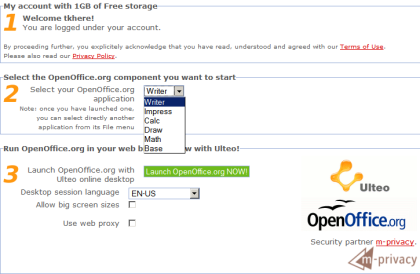
a modern web-browser with Javascript and the Sun Java Runtime 1.4+ Environment plugin enabled. It's been successfully tested on Firefox 1.5+, IE6/IE7, and Safari.
Ulteo's online OpenOffice provides a fairly generous 1GB of free storage upon registration of an account, comes with support for PDF output and the OpenDocument Format as well as collaboration features. Unfortunately, their OpenOffice servers are currently overwhelmed by enthusiastic users, so you can only register for an account and wait for the traffic to ease off.
For a quick preview of what it's like, check out Hands on with the new online version of OpenOffice.org @ Ars Technica. Strangely, the Ars writer could not find any of the collaboration features that Ulteo claimed their online OpenOfice would have. Like the Ars guy, I'm gonna attribute this omission to its beta status.
Tuesday, December 18, 2007
Tired of waiting for your tiny teacup pigs to arrive? Or are you still in the six month long line? How about getting lokulokus for the time being? Squash the lokulokus and watch them regain their form. Not enough? Do it over and over again and be amazed as the pigs fatten up for your perverted pleasure. I've always wanted to squeeze the fat out of a pig. :)
Visit the Official lokuloku site.
[via Pig Toy Gets Completely Squashed, Raises Like Terminator T1000 @ Gizmodo]
Will Smith's upcoming film, Hancock, is about him starring as a super-laid-back superhero. How much of a bum is he, you ask. Well, just click play to find out. Don't miss the wicked ending!
After laughing my way through it, I'm sensing that Hancock = the movie version of What if Superman was one of us (song: What if God was One of Us by Joan Osborne).
Monday, December 17, 2007
I'm a bit late on this one but here's the crappy 6:30 minutes in-film cam footage of the Dark Knight aka the IMAX Prologue (I'm sure you can guess why). This short clip is all about the Joker and his crew, so fans of the Dark Knight himself may be quite disappointed. Not a problem for me though, although I'd prefer the rest of it as well. :D
As for the official high-res trailer (Death trap), you can also watch and download it at A Taste For The Theatrical.
Wednesday, December 12, 2007
AppJet

Today is/was the launch of AppJet, a site that simplifies the creation of web applications. Based entirely on server-side javascript, AppJet applications are written with a combination of the core javascript language and their custom written libraries, which are relatively easy to pickup compared to other languages.
All you need to get started is your browser, as their browser based IDE includes syntax highlighting, preview and publishing features. Any app you write can be hosted for free on their site and a 10MB persistent storage is also provided if your application requires it.

As I browsed through the AppJet site, I decided to code a very simple app to see how long it would take, just to test out AppJet. ;) True enough, after about 30 minutes, I managed to finish my simple web proxy. Much of my time was spent on reading the documentation and searching for relevant functions rather than coding.
A simple proxy uses the wget function to download the HTML of remote sites and spits that HTML back out into a div. It is very basic and will not retrieve anything other than text. If you happen to see images, you're downloading them from the originating server and not from AppJet.
After my short and pleasant experience with AppJet, I'm wondering if I should port tk Google Charter over. It'll be neat to have data storage so that I can implement a last 5 charts feature or something similar.
Tuesday, December 11, 2007
Monday, December 10, 2007
Offtopic: Still no movement in the iPhone hackers camp. :( Meanwhile, tk Google Charter development goes on, although a new release isn't expected soon. :D
thesixtyone

Discover and vote for new music at thesixtyone. Listen to any song and if you like what you hear, bump it up. But don't go about bumping songs indiscriminately though. Each bump costs you some points which you'll earn back if the song gets bumped by others.
Earn points by sampling tracks sitting in the Rack (upcoming songs). As you accumulate points, your level increases and you can start to do cool stuff like multi-bumping a single song.

Unlike most sites, thesixtyone provides full length songs (128kbps MP3) that are uploaded by the artists themselves. These are hosted on Amazon's servers so you can sit back, relax and enjoy the fast loading music.
While I was on the site, I noticed some familiar tunes like CSS's Music is My Hot, Hot Sex, which is currently looping on everyone's playlist. :) After listening to a couple of tracks, I actually discovered some that were worth hearing again. This was quite unexpected and surprising to me, as most music discovery services require some time to work successfully, despite my varied and fairly tolerant musical tastes.
thesixtyone is supported by donations and song purchases made through the AmazonMP3 service.
Drawter
Drawter is a WYSIWYG HTML page creator with a twist. Instead of manually typing out everything, you draw it out on a canvas and it outputs the code for you.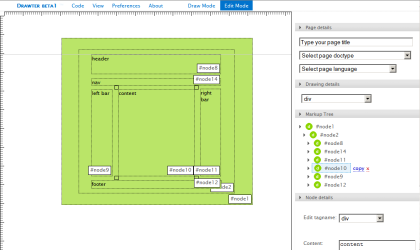
As you begin showing off your artistry in draw mode, don't worry about making any mistakes. Simply switch to edit mode, select an element to resize it or change its type. You can also add text content or edit its attributes and styles. When you're done, it's time to generate your code.

The generated code is split into 3 sections - all site, HTML and CSS. All site displays the HTML code together with the CSS in the head tag (inline styles), while HTML and CSS show only the HTML and CSS respectively.
With support for HTML and XHTML as well as CSS, Drawter is a great tool for novices to create a site's layout with proper HTML or for pros to conceptualize a site's potential layout. However if you can't live without pixel prefect positioning, come prepared with some patience and mouse dexterity. Snap to grid would surely be a welcome feature in future versions of this handy tool.
Sunday, December 09, 2007
At first glance, it looks like I just made some minor interface enhancements to tk Google Charter like styling the text boxes and drop down lists. However, there's more to that than meets the eye. ;)
The most important functionality, the ability to generate line and bar charts, that was lacking in the last version was added, which means that all types of charts that Google Charts API handles are now supported by tk Google Charter.
If you have no idea what your selected chart type would look like, simply choose any one that you're interested in. After making the big decision, my frenzied coding squirrels will scurry away and churn out a pretty little demo chart just for you with a little help from the Google pigeons. (I instructed them to call it a preview chart, but they whispered to me that it was confusing, since there was another preview chart.)
Lastly, chart size was also split up into width and height. My intelligent squirrels agree that it's more intuitive than typing 300x200. Maybe I should feed them more nuts. Then I'll get more ideas and you'll get quicker updates.
Disclaimer: No frenzied coding squirrels were ill-treated in the development of tk Google Charter or this post.

Saturday, December 08, 2007

What is tk Google Charter?
tk Google Charter is a graphical interface for Google Charts API. Put simply, it's a nice and quick way to create charts. There's no help documentation since you will not need one. :PUsage
Point, click and go! Yes, it's that simple. ;) (Well, you'll need to enter your data as well...)Status
Since I just wrote this app without putting much thought into its technical design, some things are still non-functional like bar and line charts. Error checking is also almost non-existent. Google has sufficient processing power to check my errors. :DEntering details like chart data at the moment is still quite cumbersome in my opinion. I've already thought of an alternative and more intuitive method of input, but this occurred after coding this. :D Next version, I guess. ;)
Credits
Google, for their Google Charts API. jQuery, for providing me with extremely concise javascript. Farbtastic, for a jQuery powered color picker. ThickBox, for a jQuery powered modal box.License
Use it, abuse it, infuse it. Link back preferred but not required.Friday, December 07, 2007
Google has done it again by releasing yet another excellent online API - Google Chart API. If you're easily frightened by that three-letter acronym, just see how easy it was for me to create the following diagram.
So what spell did I cast? Oh I just took this URL:

http://chart.apis.google.com/chart?cht=p3&chd=t:83.0,17.0&chs=400x200&chl=Fake (83%)|Real (17%)&chtt=A+study+shows+83%+of+all+statistics+are+made+up+on+the+spot.
and stuck it into an img tag. Now that wasn't so hard, was it?
Ok, now you're wondering what all those URL parameters mean. For your benefit, here's what they stand for. :)
cht = chart type
chd = chart data
chs = chart size
chl = chart label (only for pie charts)
chtt = chart title
Want to know even more? Well, that's what the Google Chart API homepage is for. ;)
Subscribe to:
Posts (Atom)