Google
You could also try tk Social Bookmarking Search or tk Video Search!
Showing posts with label free. Show all posts

Thursday, December 20, 2007

Howto: Be a real Jackass and Download Jackass 2.5 from BlockBuster (includes non-US workaround!)

2 comments

By now, you should have heard that you could (legally) watch Jackass 2.5 in the comfort of your home. Just head over to the (before 2008!), show some ID and success! Paramount Pictures, buffering, Johnny Knoxville, pause, rinse and repeat. Or not.

Tired of the occasional stuttering and frequent pauses, the jackass side of me kicked into motion and came up with an ingenious scheme to download Jackass 2.5 so that I could actually watch it and not wait for it. After I tasted sweet success in this endeavor however, the better part of me came into play once again, which is why you're reading this guide right now.

Tools of the trade

First things first. Let's get ourselves prepared. You'll need to download and install the following tools/programs.
Note: Remember to uncheck the installation of the toolbar for Flashget.

Get me that Jackass!

Once you're sure you've got everything installed, it's time to get into action.

  1. If you're outside the US, start HotSpot Shield. Next, right-click on its icon in your system tray and click on Connect. A browser window should popup and show Hotspot Shield connecting to its servers. When its icon looks like this Good to go!, you're good to go.

    Connecting...

    Note: HotSpot Shield has a server that seems to be mis-configured in some way. Specifically DNS lookups will fail so your browser will complain about being unable to find sites. If you can't visit any site after Hotspot Shield's icon turns green, simply disconnect and reconnect. Pray that you don't connect to the same server (1/7 probability, a bit lower than ) as these connections are made randomly. If you know how OpenVPN works, you can also edit the config to avoid this.

  2. Next, run Firefox and clear out your cookies. This is to remove the evil jackass_geo_check cookie that you get when you first visited the Jackass site.

    Clear them out!

  3. Surf down to the in Firefox.

  4. Surrender your email address to them or use to get a disposable one. After confirming the email address, login (by entering your email address) to begin viewing Jackass 2.5.

  5. Before it starts however, a short advertisement featuring a spinning globe will get in your way. Ignore it or you could watch it if you really want to. While this advert is playing, click on the arrow beside Download Helper icon (three colored spinning balls) and observe the dropdown menu carefully. You may need to wait a while, but an option called "jackass25_1000k_v1_feature_production.wmv" should appear.

    Download Helper

  6. When that option appears in the dropdown menu, click on it and save it as a text file.

    Save as a text file

  7. Open up the text file you'd just saved and copy the mms link (Ctrl+c) inside of it. It should look similar to the one below.
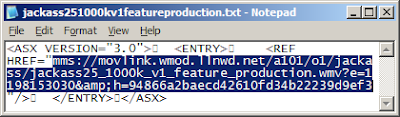
    Open text file

  8. Now close Hotspot Shield, run Flashget and add a new Flashget download by pressing F4 when the Flashget window appears. Flashget is pretty smart as it'll automatically detect the mms link you just copied (to your clipboard) and paste it into the URL box, so you'll just need to configure the rest of the options as seen below.
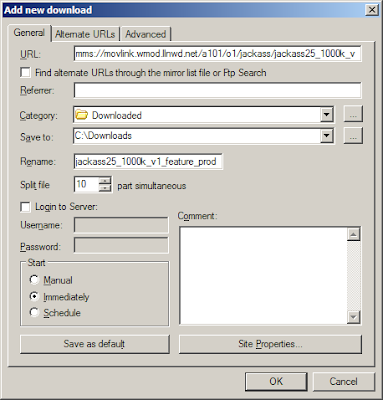
    New Flashget download

  9. Begin your download by clicking ok.

    Jackass 2.5 download

  10. Profit!


DocSyncer Beta Now Open to Public (refer new members and win an 8GB iPhone!)

Comments

has finally opened their doors to the public. From now until midnight of Christmas Day, the user that refers the most number of new members will win an 8GB iPhone! If you would like to see me win that 8GB iPhone, just click and sign up for DocSyncer.

What's DocSyncer?

Ever had the situation where you can't find the document you want? With DocSyncer, you can simply sync them all into your DocSyncer account and you'll be able to access all of them from one common location. When you install DocSyncer on your computer, it'll scan your computer for documents and upload them to your DocSyncer and Google Docs accounts. If you edit any of them, DocSyncer will detect this and sync the new versions into both your accounts, while retaining the old ones.

Using DocSyncer

There are a couple of things to do when you first log in to DocSyncer. The very first thing you should do is grant DocSyncer access to your Google Docs account. This is simple to do and should be the first thing you see after logging in for the first time.

Granting DocSyncer access

Next, you'll be prompted to change your password. For security reasons, sticking to the password that they generated for you is not a good idea. So go ahead and switch it to a decent password.

Change your password

Finally, you'll be asked to download and install DocSyncer. This is required for syncing your documents to your DocSyncer account and can be installed on as many computers as you want. It currently runs on Windows 2000/XP/Vista, with a Mac OS X version in the works.

DocSyncer download

However, one other thing I would recommend is to go into your settings and changing "Always use SSL to view documents" to Yes. For some reason, this was set to No by default.

Enable SSL

Me and DocSyncer

After installing DocSyncer on my computer, I created a test text document and waited for the magic to happen. Fortunately for me, it wasn't long before it appeared in my DocSyncer account. However, unlike DocSyncer, syncing to Google Docs is not immediate and took quite a while to occur (about 15 - 20 minutes). This is a known issue and the DocSyncer Team hopes to make Google Docs syncing immediate. (I know the screenshot says otherwise, but that's beacuse I took it after it synced to show you the full range of right-click options.)

Welcome to DocSyncer!

DocSyncer

While waiting for DocSyncer to update the files in my Google Docs, I edited the text document and wondered what would happen. About a minute later, the new version appeared in my DocSyncer account, with the older version available for download! Although I had expected this, it's pretty cool to see it in action.

DocSyncer

With nothing showing up in my Google Docs, I tried renaming the test document. I thought to myself, "surely, DocSyncer wouldn't know what to do now". Sadly, my devious plans to trip up DocSyncer weren't going as planned. DocSyncer handled it easily as you can see below.

DocSyncer

By now the files had appeared in my Google Docs account. Each new revision was uploaded as a separate file and the uploaded files weren't organized into their respective folders. Both are known issues that they're currently working on. However, be aware that if you edit a file in Google Docs, DocSyncer won't know about it unless you save it to your computer and launch DocSyncer for syncing.

DocSyncer

I didn't mention this at the beginning but the very first time I ran DocSyncer, I was wondering why my other documents weren't being synced. As it turns out, syncing is currently limited to the My Documents and Desktop folder. At the moment you can only turn off/on syncing for these folders, although they'll be expanding this to include all folders.

DocSyncer

Despite the minor setbacks I've experienced in DocSyncer, using it was mostly a pleasant experience. Even though it's in beta right now, there are no major show-stoppers, thus making it suitable for daily usage. As it continues to evolve, I'd expect it to improve even further in the future.


Wednesday, December 19, 2007

Launchy goes 2.0!

Comments

A new version of was just launched by the Launchy team! New in this release are awesome skins and icons, cool fading effects, Vista support and well, "it’s just better".

Launchy is a program/shortcut launcher that was

designed to help you forget about your start menu, the icons on your desktop, and even your file manager. Launchy indexes the programs in your start menu and can launch your documents, project files, folders, and bookmarks with just a few keystrokes!

Using Launchy

Launchy in action

Need the command prompt? Or did you mean the Control Panel? Launchy's smart auto-suggest is so good, it's like it can read your mind. The default install of Launchy only indexes the start menu and a few other locations, so if you have programs that do not create start menu icons (portable apps comes to mind), you'll need to add them to Launchy.

Need to Google something?

With the Weby plugin in Launchy, it's so easy to Google a term. First you'll need to hit Alt+Space to bring up Launchy. Next type "google". Now hit Tab and you'll see an arrow appear. Key in your search terms, press enter and Lanuchy will do the rest. Other supported web searches include IMDB, Wikipedia, Yahoo and more.

However, that's not all Launchy can do. For example, basic arithmetic is a piece of cake for Launchy. You can also extend Launchy's abilities with custom commands and or theme Launchy by downloading new skins.

.


Ulteo launches Online OpenOffice.org Beta

Comments

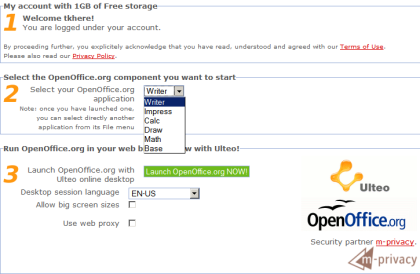
has squeezed the entire suite online, which allows you to bring along your favorite open source office programs together with you, even if you don't possess a thumbdrive.

Online OpenOffice

According to Ulteo, all you'll need is

a modern web-browser with Javascript and the Sun Java Runtime 1.4+ Environment plugin enabled. It's been successfully tested on Firefox 1.5+, IE6/IE7, and Safari.


Ulteo's online OpenOffice provides a fairly generous 1GB of free storage upon registration of an account, comes with support for PDF output and the OpenDocument Format as well as collaboration features. Unfortunately, their OpenOffice servers are currently overwhelmed by enthusiastic users, so you can only register for an account and wait for the traffic to ease off.

For a quick preview of what it's like, check out . Strangely, the Ars writer could not find any of the collaboration features that . Like the Ars guy, I'm gonna attribute this omission to its beta status.


Sunday, December 16, 2007

Watch Full-Length Movies on Hulu as Well!

3 comments

Ever since I received my Hulu invite 2 weeks back, I haven't really taken much time to browse through the site (mainly because I was under the impression that Hulu = TV shows and after a quick glance I concluded that they haven't got any new shows to offer me). However, this weekend I took some time to look around Hulu and was pleasantly surprised by what I found.

OMG111!!! Movies too‽

Contrary to popular belief (by popular I really mean my own), Hulu does not focus solely on TV. It appears that a very small section of the site is home to full-length streaming movies as well.

Full length streaming movies on Hulu

Full length streaming movies on Hulu

And like everything else on Hulu, you can take it and embed it anywhere you want.


If you're in the Hulu beta, check out and for the 10 movies shown above.


Friday, December 14, 2007

Free: Win/Mac DivX Pro Holiday Download

Comments

For a limited time only, the DivX Pro Bundle is available for absolutely free! Normally priced at $19.99, the download includes the pro versions of DivX Codec and DivX Converter as well as the free DivX Player and DivX Web Player.

With the DivX Codec and DivX Converter, you will be able to playback DivX videos as well as encode videos into the DivX format, which can then be uploaded to Stage6 for sharing. These DivX videos will be compressed into smaller file sizes than the original files, but will retain much of their quality.

To take advantage of this offer, simply click on the appropriate link: |

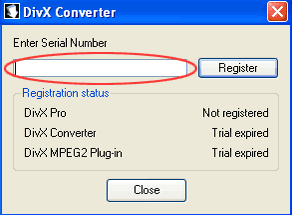
Follow the instructions on the site to install DivX Pro and when prompted for a serial number, just copy and paste the listed codes below.

Serial Numbers

Windows DivX Pro serial

Windows: A3NI9M7P47B325A52C26


Mac DivX Pro serial
Mac: 338BSZ759249T26B2M9E


If you arrived at the party late, another alternative is to to your site and send the URL to DivX for a free copy of DivX Pro.

[via ]


Wednesday, December 12, 2007

AppJet - Create Web Apps in a Flash!

Comments

AppJet

AppJet

Today is/was the launch of , a site that simplifies the creation of web applications. Based entirely on server-side javascript, AppJet applications are written with a combination of the core javascript language and their custom written libraries, which are relatively easy to pickup compared to other languages.

All you need to get started is your browser, as their browser based IDE includes syntax highlighting, preview and publishing features. Any app you write can be hosted for free on their site and a 10MB persistent storage is also provided if your application requires it.

AppJet IDE

As I browsed through the AppJet site, I decided to code a very simple app to see how long it would take, just to test out AppJet. ;) True enough, after about 30 minutes, I managed to finish . Much of my time was spent on reading the documentation and searching for relevant functions rather than coding.

A simple proxy uses the wget function to download the HTML of remote sites and spits that HTML back out into a div. It is very basic and will not retrieve anything other than text. If you happen to see images, you're downloading them from the originating server and not from AppJet.

After my short and pleasant experience with AppJet, I'm wondering if I should port over. It'll be neat to have data storage so that I can implement a last 5 charts feature or something similar.


Blog about PQ Talking Photo and Get It Free!

Comments

Dicky @ PQ Computing Inc just emailed me about an excellent deal that they're currently offering. Simply talk about in your blog and you'll be able to receive this $59.90 software for free!

In case you haven't heard about PQ Talking Photo, it allows you to convert your photos into animated characters. With a few clicks, you can animate many different types of photos and sync them to speech. With Christmas just around the corner, it's a great way to amuse your friends and family.


blogmyspacedvd to ipod video convertertalkingphoto, dvd to psp convertertalkingphoto, dvd to zunetalking photo album


If you're interested, you should act fast as this is a limited time offer that expires after Christmas. Head over .


Tuesday, December 11, 2007

Is There A Need for OPENhulu?

Comments

Over at last100, (this is a well-known dude on digg, etc) mentions that with rising in popularity, people were falling over themselves to get an invite. Supposedly, Hulu is a "highly exclusive closed" private beta that is open to only select individuals.

Inside the Hulu beta

Highly Exclusive? O Rly?

Like several others, I found this mildly amusing and surprising, since I received an invite 2 weeks back. While it's true that Hulu hasn't opened its doors to everyone, it wasn't terribly difficult to gain access. Here's what I did - enter my email address at Hulu and wait patiently for my invite. Was that really so hard?

OPENhulu - Hulu for everyone?

But we live in an era where we're pampered with instant gratification. Hence the post introduces someone named Matt, who came up with the bright idea of embedding Hulu videos on a site he created - you've guessed it - . By embedding the Hulu videos into the site, OPENhulu bypasses one aspect of Hulu's artificial limitations - the invite only requirement.

Inside OPENhulu

Nope...

However, that is about the only limitation that OPENhulu circumvents. If you're located outside the US, videos will still refuse to stream for you, leaving you with a nice message that reads "this video is not currently available in your country or region". I'm sure you should know by now that US ≠ world and OPENhulu is sadly only open to US folks.

What about US visitors that haven't gotten the memo? Well, the problem with OPENhulu is that only select TV series have been embedded. And by that, I mean a very small handful. 5 - 10% perhaps. So you can't actually watch everything Hulu has to offer on OPENhulu.

The alternative techniques

When Hulu first launched, I blogged about methods for bypassing Hulu's closed wall. One of them uses and allows you to watch the videos in full screen. However, these videos have no titles, which is a major inconvenience.

The other workaround is to view them on or . I believe that the full hulu collection is available on these partner sites. Unfortunately, you'll still need to be located in the US to view them.

So why do we need OPENhulu?

Is OPENhulu a solution looking for a problem? It sure looks that way especially with Hulu's partner sites providing the full catalog of Hulu videos. Maybe someone can enlighten me.


Monday, December 10, 2007

Free: thesixtyone, Drawter

Comments

Offtopic: Still no movement in the iPhone hackers camp. :( Meanwhile, development goes on, although a new release isn't expected soon. :D

thesixtyone

thesixtyone

Discover and vote for new music at . Listen to any song and if you like what you hear, bump it up. But don't go about bumping songs indiscriminately though. Each bump costs you some points which you'll earn back if the song gets bumped by others.

Earn points by sampling tracks sitting in the Rack (upcoming songs). As you accumulate points, your level increases and you can start to do cool stuff like multi-bumping a single song.

thesixtyone

Unlike most sites, thesixtyone provides full length songs (128kbps MP3) that are uploaded by the artists themselves. These are hosted on Amazon's servers so you can sit back, relax and enjoy the fast loading music.

While I was on the site, I noticed some familiar tunes like CSS's , which is currently looping on everyone's playlist. :) After listening to a couple of tracks, I actually discovered some that were worth hearing again. This was quite unexpected and surprising to me, as most music discovery services require some time to work successfully, despite my varied and fairly tolerant musical tastes.

thesixtyone is supported by donations and song purchases made through the AmazonMP3 service.

Drawter

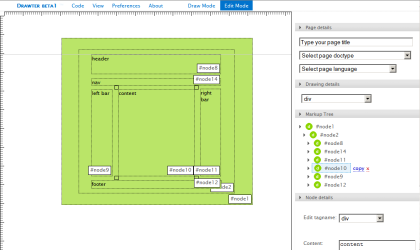
is a HTML page creator with a twist. Instead of manually typing out everything, you draw it out on a canvas and it outputs the code for you.

Drawter

As you begin showing off your artistry in draw mode, don't worry about making any mistakes. Simply switch to edit mode, select an element to resize it or change its type. You can also add text content or edit its attributes and styles. When you're done, it's time to generate your code.

Drawter - code generated

The generated code is split into 3 sections - all site, HTML and CSS. All site displays the HTML code together with the CSS in the head tag (inline styles), while HTML and CSS show only the HTML and CSS respectively.

With support for HTML and XHTML as well as CSS, Drawter is a great tool for novices to create a site's layout with proper HTML or for pros to conceptualize a site's potential layout. However if you can't live without pixel prefect positioning, come prepared with some patience and mouse dexterity. Snap to grid would surely be a welcome feature in future versions of this handy tool.


Sunday, December 09, 2007

Free: ShortcutGuide, Fonts Of The Month

Comments

Offtopic: Haven't had a "free" post for some time, so it's time to bring it back. :) No iPhone post today either, but things are mostly stagnant at the moment. Unless you consider baseless rumors interesting...

ShortcutGuide

ShortcutGuide Started by 2 grad students, ShortcutGuide is home to 952 shortcuts from a selection of 34 programs which includes desktop apps like Windows and iTunes and online apps like Gmail. Rather than simply listing the shortcuts, ShortcutGuide highlights possible key combinations on a virtual keyboard and describes their actions when you hover your cursor over a key.

Shortcuts are also categorized based on their actions and hovering over an action results in the key combination of the virtual keyboard being highlighted. It's these little touches that make ShortcutGuide a pleasure to use. However, while at the site, I noticed that one Windows shortcut - Win+D (toggle show desktop) - was not included. I didn't go looking for more missing shortcuts, but it looks like they have much to learn. :P

Smashing Magazine's Free Fonts of the month

Droid fonts

This month, looks at Relato Sans, Google Android fonts and the iPhone fonts. It may not be much to choose from but rest assured that they will look fantastic almost anywhere. I'm not sure which one I prefer since they're all fabulous.


Quick tk Google Charter Update

Comments

tk Google Charter

At first glance, it looks like I just made some minor interface enhancements to like styling the text boxes and drop down lists. However, there's more to that than meets the eye. ;)

The most important functionality, the ability to generate line and bar charts, that was lacking in the last version was added, which means that all types of charts that Google Charts API handles are now supported by tk Google Charter.

If you have no idea what your selected chart type would look like, simply choose any one that you're interested in. After making the big decision, my frenzied coding squirrels will scurry away and churn out a pretty little demo chart just for you with a little help from the Google pigeons. (I instructed them to call it a preview chart, but they whispered to me that it was confusing, since there was another preview chart.)

Lastly, chart size was also split up into width and height. My intelligent squirrels agree that it's more intuitive than typing 300x200. Maybe I should feed them more nuts. Then I'll get more ideas and you'll get quicker updates.

Disclaimer: No frenzied coding squirrels were ill-treated in the development of tk Google Charter or this post.


Saturday, December 08, 2007

tk Google Charter - Google Charts API Front End (aka point and click charts)

4 comments

tk Google Charter

What is tk Google Charter?

is a graphical interface for . Put simply, it's a nice and quick way to create charts. There's no help documentation since you will not need one. :P

Usage

Point, click and go! Yes, it's that simple. ;) (Well, you'll need to enter your data as well...)

Status

Since I just wrote this app without putting much thought into its technical design, some things are still non-functional like bar and line charts. Error checking is also almost non-existent. Google has sufficient processing power to check my errors. :D

Entering details like chart data at the moment is still quite cumbersome in my opinion. I've already thought of an alternative and more intuitive method of input, but this occurred after coding this. :D Next version, I guess. ;)

Credits

Google, for their . , for providing me with extremely concise javascript. , for a jQuery powered color picker. , for a jQuery powered modal box.

License

Use it, abuse it, infuse it. Link back preferred but not required.


Friday, December 07, 2007

Google Chart API = Charts Made Easy (it couldn't get any simpler!)

Comments

Google has done it again by releasing yet another excellent online API - . If you're easily frightened by that three-letter acronym, just see how easy it was for me to create the following diagram.

A study shows 83% of all statistics are made up on the spot.

So what spell did I cast? Oh I just took this URL:

http://chart.apis.google.com/chart?cht=p3&chd=t:83.0,17.0&chs=400x200&chl=Fake (83%)|Real (17%)&chtt=A+study+shows+83%+of+all+statistics+are+made+up+on+the+spot.


and stuck it into an img tag. Now that wasn't so hard, was it?

Ok, now you're wondering what all those URL parameters mean. For your benefit, here's what they stand for. :)

cht = chart type
chd = chart data
chs = chart size
chl = chart label (only for pie charts)
chtt = chart title


Want to know even more? Well, that's what the is for. ;)


Thursday, December 06, 2007

winChain - Quick Start to Native iPhone App Development on Windows

2 comments

If you've always wanted to code very own iPhone program but were afraid to try, Drakenza, the author of , has come up with a pre-built environment for developing iPhone apps on Windows.

winChain

A 500MB+ download in total, simplifies the setup and installation of required files and programs. winChain also comes with a Template Generator that can be used to create a skeleton application. You can then code in this skeleton application and build your first iPhone app. For detailed instructions on using/installing winChain, head over to the .

With the release of winChain, at least one major obstacle is out of the way. Now all you have to do is pick up programming. ;)


Tuesday, December 04, 2007

Windows Tip: Lower Your StartUp Time!

Comments

Do you have a gazillion programs loading at startup? Like your antivirus, firewall, antispyware, wireless manager, Windows Live Messenger and... well you get the idea. Waiting for all of them to startup is a daily sacred ritual, but not one that you particularly enjoy.

One way around this is a no-brainer - just remove some of the programs that load when Windows starts up. However, sacrificing any one of those frivolous startups is akin to asking you to go without your daily cup of caffeine. This must be your lucky day as there's another way out without binning all those wonderful programs.

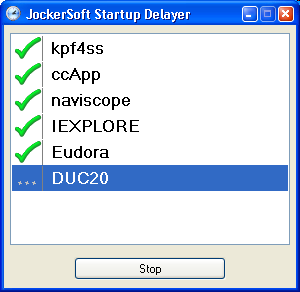
Startup Delayer

(no they're not jokers) enables you to delay the startup of programs so that they actually load faster, which in effect boosts the speed of Windows startup. If you're thinking that sounds rather contradictory, think of it this way. Your computer can only load a certain amount of programs at an optimum speed. Once you exceed that, diminishing returns set in and everything slows to a crawl.

StartupDelayer mitigates this by introducing a small interval between the initialization of each program. This way your computer is able to start each program quickly, which translates into faster startup.

Startup Delayer

Another use of StartupDelayer is to batch run a number of programs. For example, your daily computer routine may consist of surfing and instant messaging while listening to your MP3s. Just add your internet browser, instant messenger and MP3 player to a sequence and assign a shortcut to your saved sequence. The next time you start your computer, just double-click the shortcut to run all 3 programs at once! (StartupDelayer is not required to batch run programs, but it is simpler than creating a batch file.)

StartupDelayer runs on Windows 98 - ME - NT 4(service pack5) - 2000 - XP - Vista and requires .


Monday, December 03, 2007

Windows Tip: Toughen Up Your ToolTips! (or how to unhide hidden tooltips)

Comments

Have you ever encountered the annoying bug where the tooltips at the system tray simply won't show up in front? I have and I can't believe the number of times when I was trying to take a quick look at the current date or the current song playing, only to be left frustrated by this disappearing trick.

Peek-a-boo!

Well someone was so irritated by it that they whipped up a fix, but the best part is it's free! Download and install into your system and no longer will you suffer at the hands of this evil bug. After installing ToolTipFixer, it'll install a Windows service that will take up only 6KB of your memory. This service is set to run automatically when Windows starts, so you'll never need to run it manually.

Cured of stage fright!

ToolTipFixer works on Windows XP/Vista and requires .


Thursday, November 29, 2007

Forex Fun with eToro

Comments

Ever since was featured on and , I've been addicted to Forex trading with eToro. Actually, I've been playing this since yesterday. :)

As TechCrunch rightly points out, eToro's friendly interface makes the boring, serious world of Forex fun. At this stage, let me just state for the record that I'm not a professional Forex trader nor do I have any prior experience with Forex trading. I do however have the (very) basic knowledge of how currencies work.

With that in mind, I skipped the introductions and dived straight into the big bad world of Forex. Out of the 4 eToro games available, the first game I tried out was the Forex marathon. Just select the currency which you think would rise above the rest and sit back and relax as they race against one another.

Forex marathon

Forex marathon, stolen from TechCrunch ;)


It was quite enjoyable to watch the Japanese sumo wrestler pitting himself against the American and European. As your selected currency rises/falls, the corresponding character will lead the pack or fall behind the rest. I'm sure many new traders will prefer this alternative representation to the standard graphs and charts as a single glance will tell you whether you made the right choice even if you're a layman.

However, Globe trader was the game that I excelled in. In Globe trader, you buy/sell currencies to make a profit. As the market fluctuates, you will hear a pinging sound, which was useful and sometimes annoying (it can be turned off).

Globe trader

Within an hour of risky trading, I made over $500. Unfortunately, my lucky streak came to an end and I ended up losing over $1000. This goes to show that the volatility of the Forex market is something that cannot be underestimated.

Although eToro's interface may seem very childish, it does actually provide vital details like the market spread, your current profit/loss and the ability to take profit or stop loss (profit/loss threshold). However, after my short trading experience, I wished it had more features like scheduling and the ability to carry out more consecutive trades. Nevertheless, eToro brings the much needed element of fun into the Forex trading world.

eToro runs on Windows XP and possibly Vista.

 
Google
You could also try tk Social Bookmarking Search or tk Video Search!