Google
You could also try tk Social Bookmarking Search or tk Video Search!

Saturday, December 22, 2007

Forbidden Kingdom Teaser Trailer! (Jackie Chan VS Jet Li!)

Comments

The Forbidden Kingdom is where Jackie Chan and Jet Li Expect some awesome ass-kicking! I'm not a big fan of the kid though. He looks a bit too goofy (and out of place) in this action film.

A discovery made by a kung fu obsessed American teen sends him on an adventure to China, where he joins up with a band of martial arts warriors in order to free the imprisoned Monkey King.


Friday, December 21, 2007

Happy Holidays Google Doodle Logo Part 1

Comments

Happy Holidays from Google

The first of Google's holiday's doodle logos for 2007 is out. Continuing with previous years' tradition of having multiple celebratory logos, teases us with the as-yet-unknown second logo that will surely be gracing the front page of Google tomorrow. Last year's series began with Google's logo decorated with a bright red ribbon on Google's big blue G and ended up with a happy kangaroo family standing in front of its logo. If you missed the 2006 series, visit to view all 5 logos. For more of previous years logos, go to .

Can you guess what's coming next?


Hellboy II: The Golden Army Trailer!

Comments

The short version from :

The mythical world starts a rebellion against humanity in order to rule the Earth, so Hellboy and his team must save the world from the rebellious creatures.

The longer version from :
After an ancient truce existing between humankind and the invisible realm of the fantastic is broken, hell on Earth is ready to erupt. A ruthless leader who treads the world above and the one below defies his bloodline and awakens an unstoppable army of creatures. Now, it’s up to the planet’s toughest, roughest superhero to battle the merciless dictator and his marauders. He may be red. He may be horned. He may be misunderstood. But when you need the job done right, it’s time to call in Hellboy (Ron Perlman).

Saving the world is a HELL of a job!


.


Thursday, December 20, 2007

Web Devs Rejoice as IE8 passes Acid2 Test

Comments

One of the biggest news in the tech world today is that Internet Explorer 8 has passed the . From the ,

As a team, we’ve spent the last year heads down working hard on IE8. Last week, we achieved an important milestone that should interest web developers. IE8 now renders the “Acid2 Face” correctly in IE8 standards mode.


Smiling for IE8

For those not in the know, the Acid2 Test was written to make it easy to test a browser's compliance with web standards like HTML4 and CSS2. There are 2 types of Acid2 Tests - with and . This was due to the fact that Internet Explorer and some other browsers do not support data URLs.

In a perfect world, browsers would have proper and consistent support for official web standards and you wouldn't need to worry about your users' browsers as long as your pages followed the official guidelines. The reason why this is such a big deal is because Internet Explorer has the largest market share and passing the test means that some time in the distant future, that perfect world may become a reality.

The ironic part about all this is that while internal builds of IE8 have passed the Acid2 Test, the Acid2 Test on The Web Standards Project site is and will fail to render properly even in compliant browsers! For a working alternative, use the one found at the .


Howto: Be a real Jackass and Download Jackass 2.5 from BlockBuster (includes non-US workaround!)

2 comments

By now, you should have heard that you could (legally) watch Jackass 2.5 in the comfort of your home. Just head over to the (before 2008!), show some ID and success! Paramount Pictures, buffering, Johnny Knoxville, pause, rinse and repeat. Or not.

Tired of the occasional stuttering and frequent pauses, the jackass side of me kicked into motion and came up with an ingenious scheme to download Jackass 2.5 so that I could actually watch it and not wait for it. After I tasted sweet success in this endeavor however, the better part of me came into play once again, which is why you're reading this guide right now.

Tools of the trade

First things first. Let's get ourselves prepared. You'll need to download and install the following tools/programs.
Note: Remember to uncheck the installation of the toolbar for Flashget.

Get me that Jackass!

Once you're sure you've got everything installed, it's time to get into action.

  1. If you're outside the US, start HotSpot Shield. Next, right-click on its icon in your system tray and click on Connect. A browser window should popup and show Hotspot Shield connecting to its servers. When its icon looks like this Good to go!, you're good to go.

    Connecting...

    Note: HotSpot Shield has a server that seems to be mis-configured in some way. Specifically DNS lookups will fail so your browser will complain about being unable to find sites. If you can't visit any site after Hotspot Shield's icon turns green, simply disconnect and reconnect. Pray that you don't connect to the same server (1/7 probability, a bit lower than ) as these connections are made randomly. If you know how OpenVPN works, you can also edit the config to avoid this.

  2. Next, run Firefox and clear out your cookies. This is to remove the evil jackass_geo_check cookie that you get when you first visited the Jackass site.

    Clear them out!

  3. Surf down to the in Firefox.

  4. Surrender your email address to them or use to get a disposable one. After confirming the email address, login (by entering your email address) to begin viewing Jackass 2.5.

  5. Before it starts however, a short advertisement featuring a spinning globe will get in your way. Ignore it or you could watch it if you really want to. While this advert is playing, click on the arrow beside Download Helper icon (three colored spinning balls) and observe the dropdown menu carefully. You may need to wait a while, but an option called "jackass25_1000k_v1_feature_production.wmv" should appear.

    Download Helper

  6. When that option appears in the dropdown menu, click on it and save it as a text file.

    Save as a text file

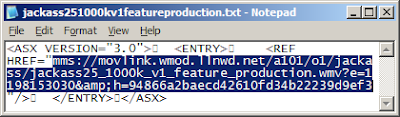
  7. Open up the text file you'd just saved and copy the mms link (Ctrl+c) inside of it. It should look similar to the one below.

    Open text file

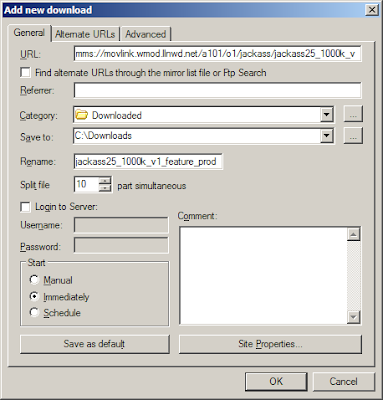
  8. Now close Hotspot Shield, run Flashget and add a new Flashget download by pressing F4 when the Flashget window appears. Flashget is pretty smart as it'll automatically detect the mms link you just copied (to your clipboard) and paste it into the URL box, so you'll just need to configure the rest of the options as seen below.

    New Flashget download

  9. Begin your download by clicking ok.

    Jackass 2.5 download

  10. Profit!

 
Google
You could also try tk Social Bookmarking Search or tk Video Search!